PROJECT 01 / AI voice agent
Alex, AI Voice Agent for the IT Service Desk
A real phone line that talks to callers and files real ServiceNow tickets.
- Azure Communication Services
- Azure OpenAI Realtime
- gpt-5-mini
- ServiceNow Table API
- Python
- FastAPI
Source private: Private employer system
- Type
- AI
- Source
- Private
- Role
- Built the service desk's AI voice agent: the call handling, the post-call ticketing, the operator console and the Azure deployment.
- Built with
- Azure Communication Services, Azure OpenAI Realtime, gpt-5-mini

01 / Overview
Overview
Call the service desk line
A real toll-free number. Alex answers and says up front that it is an AI.
Describe the problem
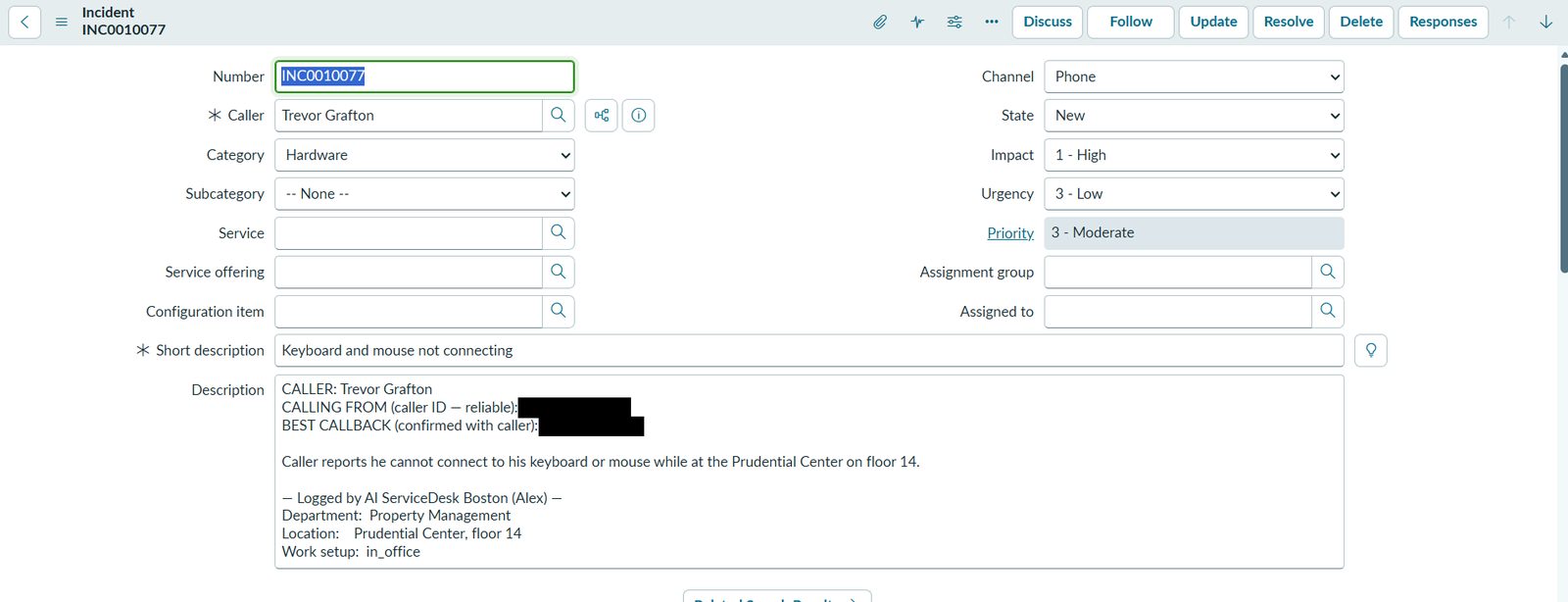
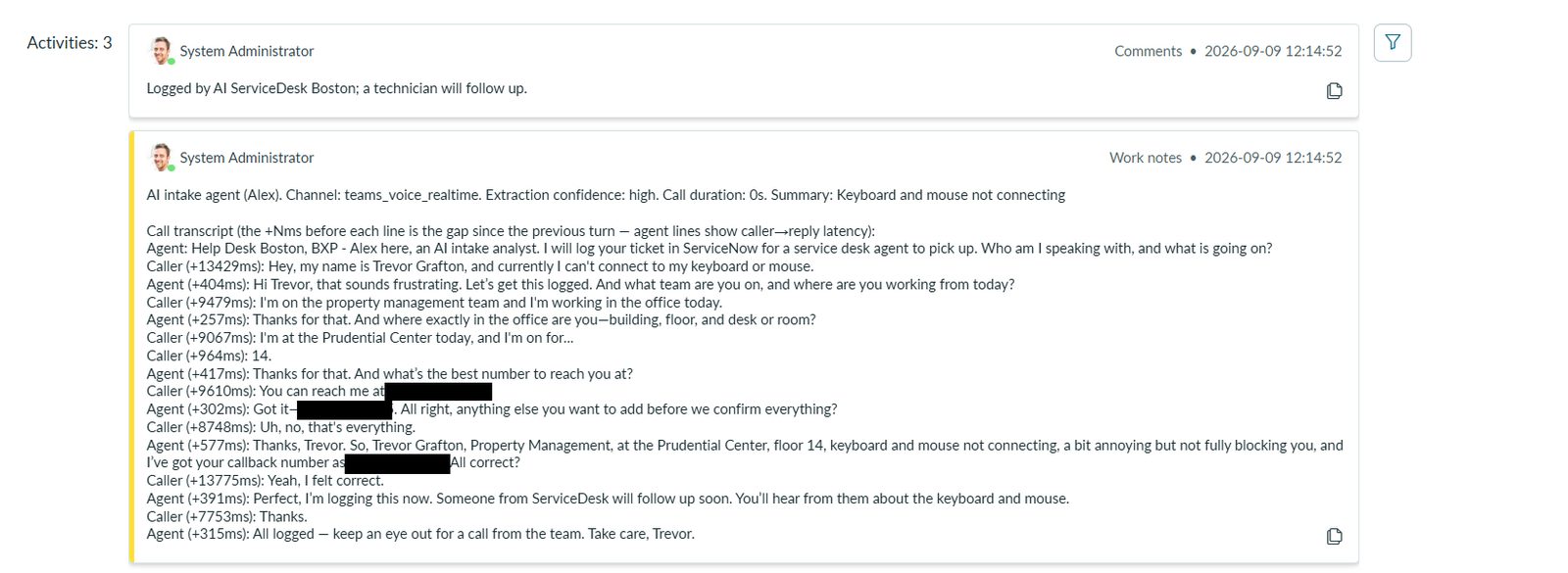
Alex asks one question at a time: name, department, location, the issue, how much it blocks you, and a callback number it reads back.
Confirm who you are, if needed
A Microsoft sign-in or an Authenticator push. After a Microsoft sign-in, Alex can tell you the ticket status of your own tickets.
Ask for a person
When a help-desk line is configured, Alex offers before the call ends to transfer you to a live agent.
Hang up and the ticket appears
A complete incident, with the transcript attached, is filed in ServiceNow after the call.
02 / Context and problem
Context and problem
Routine intake (name, department, location, urgency) takes analyst time, there is no after-hours coverage, callers wait on hold, and ticket quality depends on who files it. Alex takes the routine intake so technicians spend their time resolving issues; it is meant to support analysts, not replace them. It runs in one Azure tenant on a real toll-free number and posts to a ServiceNow developer instance. I pitched it to my manager in a demo, with a 4 to 8 week pilot proposed.
03 / My role
My role
Built the service desk's AI voice agent: the call handling, the post-call ticketing, the operator console and the Azure deployment.
04 / How it works
How it works
The call path
The console gate stack
How the Azure pieces fit
Caller dials in
Event Grid hands the incoming call to the app and Azure Communication Services answers it.
Audio stream opens
Azure Communication Services opens a two-way media WebSocket to a FastAPI app on Azure App Service.
Live conversation
Audio is relayed both ways to Azure OpenAI Realtime (gpt-realtime-2.1-mini), which listens and speaks directly.
Rules enforced in code
The server reads back the 10-digit callback number, will not let the call end until impact, urgency and callback are collected, and never files a P1.
Optional identity check
A Microsoft device-code sign-in or an Authenticator push; the ticket records whether the caller was verified.
Secrets redacted
Anything the caller frames as a password or other credential is redacted at transcription, before it is stored anywhere.
Ticket extracted
After the caller hangs up, gpt-5-mini, which has no tools, turns the transcript into structured ticket fields.
Ticket filed
Plain Python posts the incident through the ServiceNow Table API with the transcript attached.
Phone line and media
Azure Communication Services owns the toll-free number and streams call audio to one FastAPI process on App Service, capped at three concurrent calls with overflow sent to the help desk.
Live conversation model
Azure OpenAI Realtime handles speech to speech and has only two tools: end the call, or transfer it to the help-desk line when one is configured.
Post-call ticketing and ServiceNow
After the call, gpt-5-mini with no tools extracts the ticket from the transcript and plain Python posts it to ServiceNow, with secrets held in Key Vault behind a managed identity.
05 / Key decisions
Key decisions
Speech to speech, not transcribe, think, speak
One realtime model hears and answers in audio, so no turn waits on a separate speech-to-text and text-to-speech hop; the transcript for the ticket is produced alongside.
Three verbs: talk, transfer, hang up
The live model has two tools, end_call and transfer_to_agent, and no ServiceNow tools. A jailbreak has nothing to reach. The old create-ticket tool was removed; tickets are now created after the call.
Narrow ServiceNow access from plain Python
Python creates the incident after both models finish, so credentials never enter a prompt. On the live call path, incidents are only created, plus one read: the ticket status of a verified caller's own tickets, only after a Microsoft sign-in.
Enforce rules in code, not in the prompt
A prompt ban stated twice had no effect: 79 of 141 turns (56%) still opened with a banned word. Anything that must happen is now driven by the server.
Transcripts only, redacted before storage
Alex does not store call audio. Spoken secrets are redacted at transcription with a deliberately narrow rule, so "I need a password reset" survives, and the app keeps its call records and logs for 30 days.
06 / Results and numbers
Results and numbers
~$20K/yr
projected annual savings
under $1K/yr
projected annual run cost
~$0.05/min
all-in cost per call minute
390 ms
median turn latency over 141 turns
~375 ms
median turn latency, later measurement
906 automated tests
collected by pytest
07 / Testing and quality
Testing and quality
- 906 automated tests collected by pytest on 2026-10-20 (owner-confirmed).
- A real call that went wrong is replayed as a test; its 12 cases fail on the old code.
- A secret scan in CI fails the build, and a route sweep found four unguarded endpoints, which were fixed.
- A code review, a security review, then call-process and whole-system security scans, each followed by fixes (September to October 2026).
08 / Limitations
Limitations
Show all limitations (8)
- It posts to a ServiceNow developer instance; moving to the company's production instance is still a decision to make.
- When the developer instance rejected logins in October, tickets failed silently. An alert on ticket-post failures is not built yet.
- Not penetration-tested.
- The service has public network access with no IP allow-list, and the operator console uses its own accounts with TOTP rather than Entra single sign-on.
- An Authenticator push proves the account owner approved, not who is on the phone, so a push never unlocks ticket status.
- The latency figures come from my resume and a later post; the repository does not hold the measurement behind them.
- One process with a SQLite store on Azure Files; that has to change before it scales out to more instances.
- The demo call video has no captions.
09 / What I learned
What I learned
- The model narrates instead of acting, so the server drives anything that must happen.
- Deployed and healthy is not the same as working; only a real call proves it.
- Shrinking the action surface fixed bugs and improved security at the same time.
- Replaying a real call as a test catches what unit tests miss.
10 / What's next
What's next
- Move to the company's Azure tenant with a least-privilege ServiceNow user.
- Alert on ticket-post failures and add scheduled backups.
- Send ticket details to the caller by SMS.
- Try newer voice models.
11 / Media gallery
Media gallery
12 / Next project